My homelab story
From an 8 port switch to 15U rack in my living room

Yes, there is a story behind it.
It started during the pandemic, when we were doing remote camera jobs for the Emmys. There was a “magic” IP Tech device that created a hardware-based VPN connection between our office and remote locations. But we constantly had problems. Disconnects. Jitter. Bandwidth issues. It was really annoying because I couldn’t do my job properly. In retrospect, it was mostly our fault because we didn’t fully understand networking. But it is always easy to blame our past selves with the knowledge we have today.
I asked someone, “How can I learn this? What should I do? I want to do networking properly.” I’m not sure when I developed this habit, but if I’m involved in something, I have to understand it. I can’t just do it blindly and trip over the same issues again and again.
Maybe I’m lucky that this is baked into my personality. I can’t just say, “I can do it,” when I don’t understand it. That is why I started my homelab: to learn things through hands-on experience.
At the time, I was thinking, “I need a UniFi Dream Router. It has everything.” But sometimes having everything in one device is the problem. Luckily, I did my research and asked around.
“Just buy a Netgate SG-1100 and a separate access point.” That was the answer and it changed a lot of things. Even separating those two functions taught me a lot. Not having an all-in-one device also allowed me to upgrade individual parts, grow the setup, spend thousands of dollars, and eventually own a 12U rack in my living room.
From networking to servers
At first, I only had a Netgate firewall, an 8-port PoE switch, a UniFi Controller, and an AP. It was cool to play with VLANs and set up separate ones for guests and the main network—even though nobody came over during the pandemic. I experimented with OpenVPN and WireGuard, checked port statistics, and messed up my network several times so badly that a full reset was the only reasonable next step.

1L mini PC
I felt like the next upgrade should be some type of server—I mean, computer—so I could run my own services. That was around the time I was transitioning from our Rental Department to the IT Department, mostly to do FileMaker development.
After watching all the ServeTheHome videos about the TinyMiniMicro project, I picked up a Lenovo M900. Shortly after that, I bought a second one because, obviously, I had to practice Proxmox clustering. Fast-forward to today: I have probably purchased more than 15 by now.*


*Some of them went to family members as their main PCs. With an NVMe SSD and an included Windows license, these tiny PCs are still among the best-value options.
Now I needed storage
Naturally, over the years I collected a lot of data. By then, I had terabytes of video footage from previous projects, along with my personal photos, and I needed a place to store virtual machine backups. The next step was finding a suitable NAS.
Remember, this was 2021, and I was still relatively new to storage. Synology felt like the obvious choice because of its easy setup and extensive included software.
Honestly, it wasn’t a bad choice. It gave me a place for photos, documents, VM backups, Time Machine backups, ISOs, and backups of Google and Microsoft accounts. More importantly, it helped us at work move away from a $20,000–$25,000-per-year storage solution to one with only a $300 annual recurring cost (that covers the C2 Cloud Storage as a backup). But that is a different story.
Usually, I like to prioritize cost, but based on my experience, a NAS is not something you want to cheap out on. Spending money on good-quality, enterprise-grade hard drives has saved me a lot of trouble. Just stop for a moment and think: What would you do if the hardware stopped working or you needed to move the data off so you could reformat or reinstall it? Do you have another unit with the same amount of space or more?
My Synology DS920 is not a set-it-and-forget-it device, but it doesn’t need much babysitting. If it is set up correctly and has no issues, I do not have to do much. Aside from an occasional failed sync or a major software update, I rarely open the UI.
The Home Assistant rabbit hole
I promise, I just wanted to turn my AC on and off. Really! One… simple… smart switch.
Every room has a temperature and humidity sensor, and doors and windows have their own sensors. My rack has RGB lighting and a fan controller. There is also a Wi-Fi air purifier… sigh. But I can control both of my ACs too.
This is probably one of the things I enjoy most. It is easy to create something that actually enhances our lives. Luckily, my fiancé is very patient with it and rarely complains about the weird glitches.
Every time we are on vacation, I miss my dim, warm lights that turn on automatically when I go to the bathroom, and the subtle notifications if I leave a window open.
I need a rack
…in a one-bedroom apartment. But how else can I practice cable management?
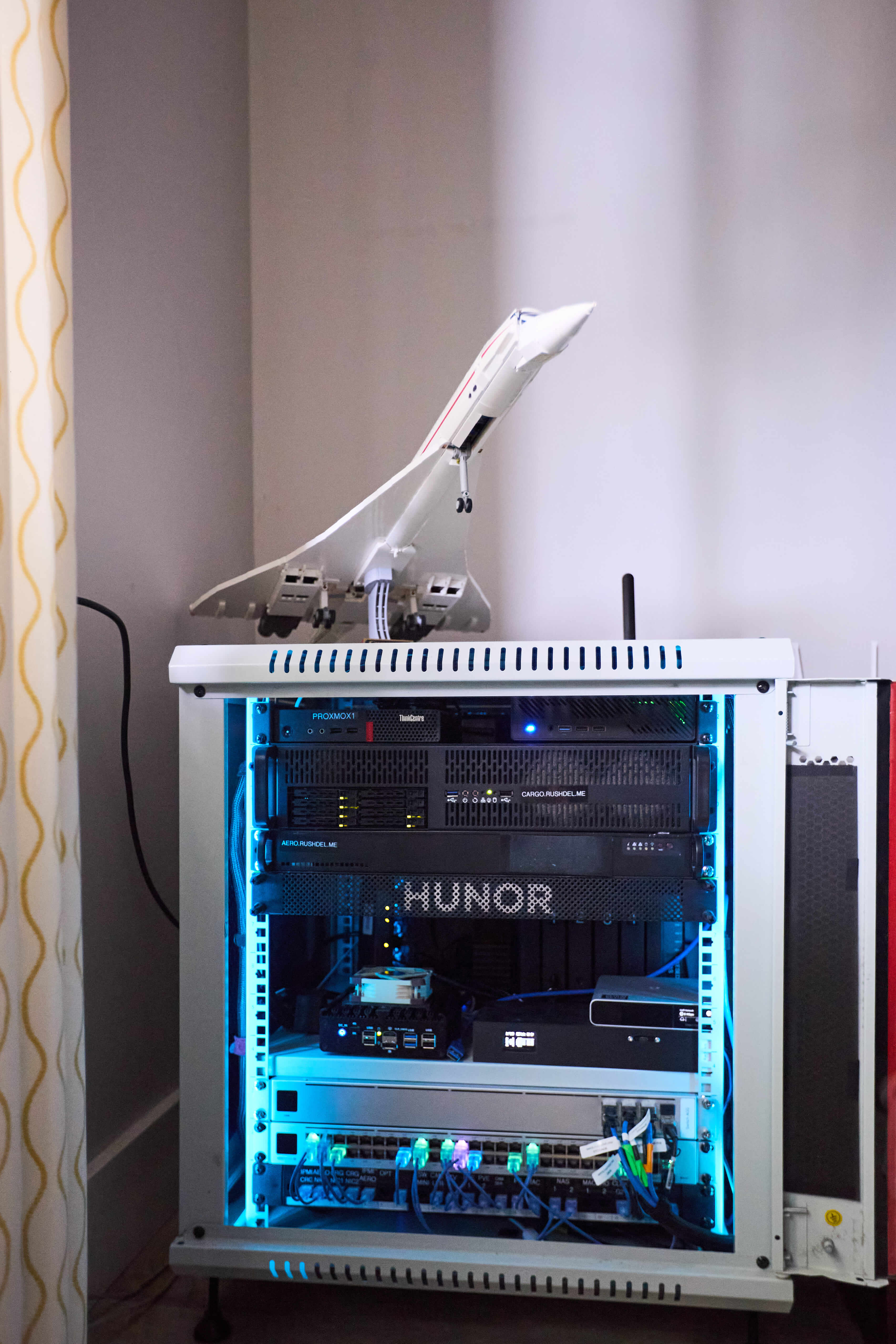
I found a reasonable solution in a white 12U, 24-inch-deep Sysrack. That allowed me to house everything from my modem and router to my switches and ever-growing collection of servers.
I think having constraints helps me come up with better solutions. With 42U, I could solve most problems by adding another shelf. With 15U, every decision matters. I had to figure out the layout pretty early: where the cables would enter and how to route them, the power requirement and the location of the fans.
Noise, heat, and power consumption are also factors. I can’t just drop in old Dell servers because I have to live in the same space.


More servers
There was a giveaway from iXsystems on Twitter—yeah, before the name change—for a $100 Newegg gift card. I had never won anything like that, so I was surprised when they reached out to me.

Do you know how I used the $100? I purchased six SATA SSDs, a 5.25-inch dock, a Supermicro motherboard, 4 × 16 GB of RAM, and a 2U case, and built my first TrueNAS server. Obviously, I treated it as permission to spend more money.
Then I found an old LTO tape controller server in a 1U Supermicro SYS-5019S-MT chassis and built my second server.

Before things got completely out of control, I had to slow down. Not only was there no space left in the rack without a major reconfiguration, but component prices had risen significantly.
This gave me an opportunity to focus on software and quality-of-life improvements: optimizing fan curves, using Zabbix to monitor systems and alert me if something happens, or even just reducing costs.

For example, I had a 2 TB Synology C2 plan for $139 per year, which I replaced with my own solution.
Why do I need a homelab?
Here is an ever-growing list of things my homelab has helped me with. In some cases, it resulted in knowledge I could apply directly at work.
- Direct Business Impact
- Switching from Egnyte, a $25,000-per-year cloud-based storage solution, to a self-managed pair of on-premises Synology systems plus cloud backup
- Removing the $3-per-user-per-month cost—$5,000–$6,000 per year—of backing up M365 accounts and replacing it with Synology Active Backup
- Implementing Bitwarden and proper password management
- Using BookStack as a company-wide knowledge base
- Networking and Infrastructure
- Using UniFi networking and Protect, and becoming familiar with the entire UniFi lineup
- Learning proper networking with pfSense and building my own pfSense router
- Using Tailscale and implementing it instead of SonicWall SSL VPN
- Writing documentation, taking notes, and using NetBox
- Learning DNS
- Automation and Monitoring
- Learning Ansible, Packer, and other tools to automate my work
- Implementing Zabbix monitoring
- Using Uptime Kuma with Pushover to monitor important services
- Using Home Assistant to monitor power usage and temperature, including in multicam racks and our server room
- Creating my own rack temperature monitor and fan controller
- Hardware and System administration
- Learning Proxmox VE and Proxmox Backup Server—including clustering, backups, organization, and every tiny detail of hosting VMs—and moving everything at work to Proxmox VE
- Setting up TrueNAS and learning best practices
- Physically building my rack, including cable management and labeling
- Planning systems and researching components
- Building and maintaining three Supermicro-based servers, including BIOS updates and hardware monitoring
- Building a self-hosted AI server with an AMD R9700
- Learning Linux, Bash scripting, and the command line
- Using Docker and Traefik, and creating my own web apps
Final words
The most important thing I learned is that my workplace is not a homelab. Just because a self-hosted solution exists does not mean it is the right solution for a business. Sometimes simply purchasing a product makes more sense if it is better and does not require babysitting.
On the other hand, my homelab is not my work. I should not spend days updating and maintaining it.
What are my next steps? Automating updates and deployments, improving monitoring, and separating the “production” homelab from the experimental one.
Full specs here