My DNS Setup
Using BIND9 and Ansible to manage my local entries
Since I watched Techno Tim’s homelab video—especially his DNS setup — I’ve wanted to build something similar. The final push came from Jeff’s video (from Craft Computing) about Technitium.
Why?
My previous setup was a mix of pfSense (running unbound) and an LXC container with BIND9. I previously tried to synchronize the two systems, but I never had the patience to finish it. It wasn’t critical enough to justify the effort.
My main goal was to move DNS services off the firewall and reduce my reliance on pfSense. I’ve occasionally considered switching to UniFi, so separating DNS felt like a good step toward making the network more modular.
Another motivation was automation. When experimenting with new services, I often want to programmatically update DNS records using Ansible. Managing DNS directly on the firewall makes this harder, and I’d rather avoid the risk of accidentally breaking firewall configuration and taking down the network for everyone.
The setup
I don’t want to stray too far off topic, but with AI now part of many development processes, I find myself asking: Who is the actual creator?
For parts of this setup I used Claude through the CLI to help finish the configuration. People often claim that AI can write code 7–10× faster than humans, so why not take advantage of that? I see my role as the orchestrator—steering the process and guiding the system toward a workable solution.
So who created the system? AI helped generate parts of it, but I designed the architecture and can still maintain and modify it. In the end, it works—and that’s what matters.
I already had some familiarity with BIND9, Ansible, LXC containers, and Tailscale, but putting everything together into a reliable solution was still challenging. After some research into DNS servers (for example: what is the difference between authoritative and forwarding) as well as available open-source options, I ultimately decided to stick with BIND9.
Using Ansible is helpful for these tasks because you can repeat the setup multiple times and apply corrections. As a starting point, I collected current entries (from the router), the BIND9 zone files and some general instructions in the CLAUDE.md file.
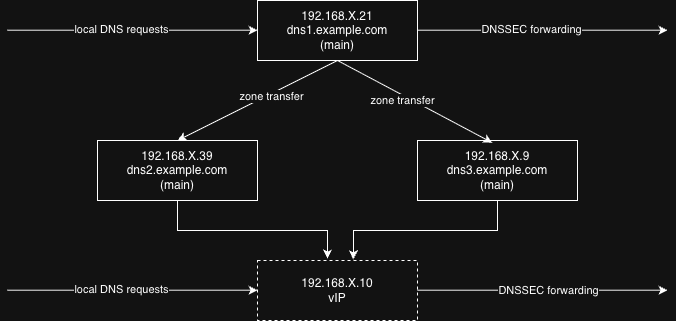
Prompt: Using BIND9, create 3 DNS servers. One is being a main and 2 of them secondaries, but sharing IPs to load balance between the two. The main DNS server (IP: 192.168.X.21) and one of the secondary (192.168.X.9) lives on the servers, but the 3rd (192.168.x.39) one is on my existing backup Pi. That means even if they are both down, I can resolve internal addresses.
In practice
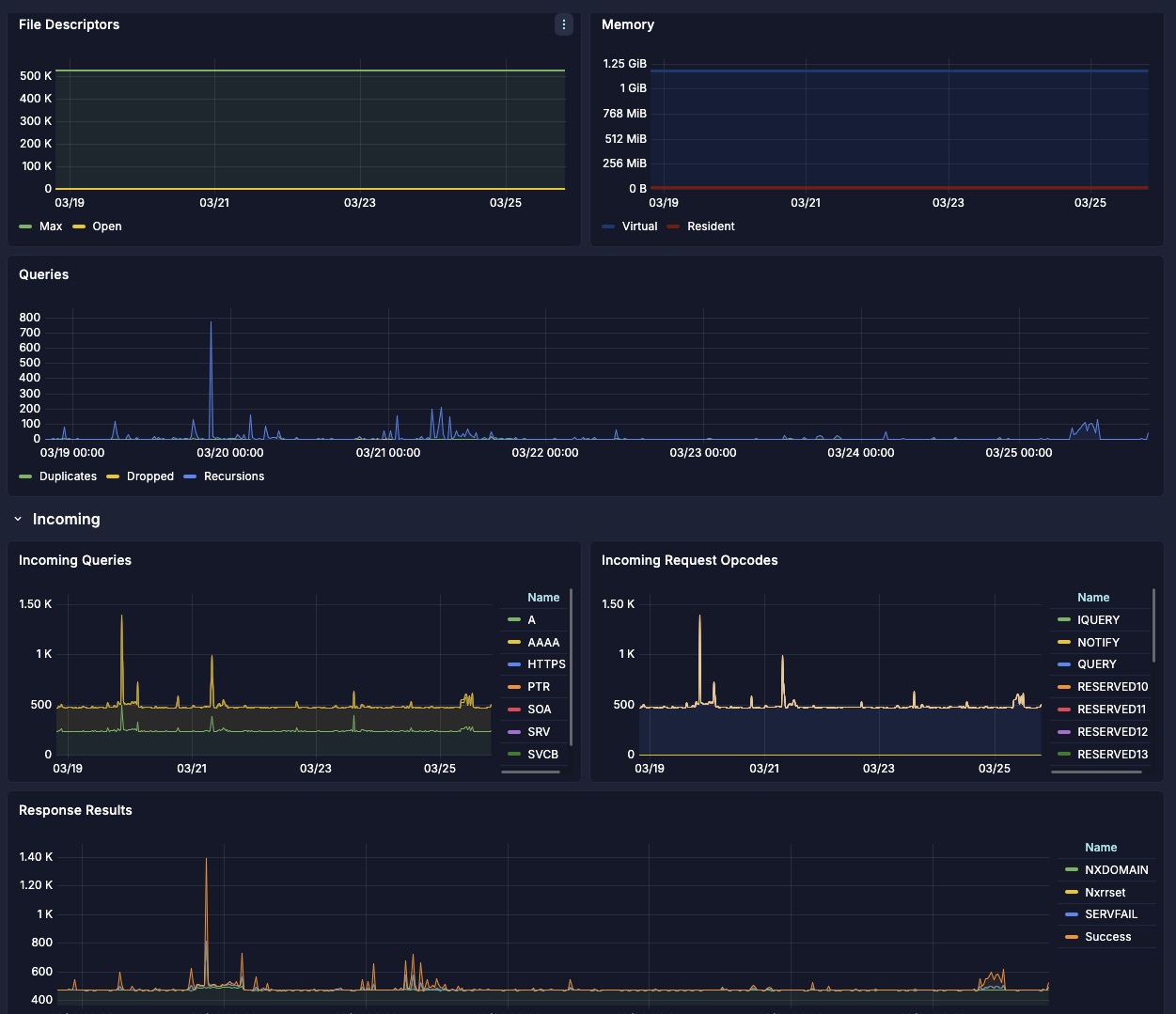
After deploying, and verifying everything worked - by setting my computer’s DNS to static IP addresses - I was happy with the setup. From there, I started adding additional features. Jeff in his video mentioned using DNSSec (DNS over TLS and DNS over HTTPS) and routing traffic through a VPN tunnel, which is becoming increasingly important. I generally prefer not to overcomplicate systems at the beginning. Instead, I like to start simple and gradually add features as needed. For now, I incorporated DNS over TLS into the Ansible playbooks. And of course—because who doesn’t like pretty graphs—I also added a Grafana dashboard to monitor DNS queries and errors.
Providing backup paths for network traffic was a concern. One of the three servers runs on a Raspberry Pi with a microSD card, which has limited write endurance. To reduce wear on the card, I configured the system so that the Pi-based DNS server primarily acts as a fallback. It only handles traffic if the other secondary server (192.168.X.9) becomes unavailable. Naturally, I tested this failover scenario before switching the network over and updating the DNS server settings in my DHCP configuration.
I am looking forward to utilizing the Ansible playbooks to deploy new entries.
If you want to use the Ansible playbooks check out my Github.